
This past Monday I presented at the Christchurch AI Meetup. We meet the 2nd Monday of every month at EPIC Innovation. If you are a local, you can join our Meetup group to get notified of upcoming events.
You can watch the replay here. We had 3 speakers presenting on the theme of Marketing & Comms with AI.
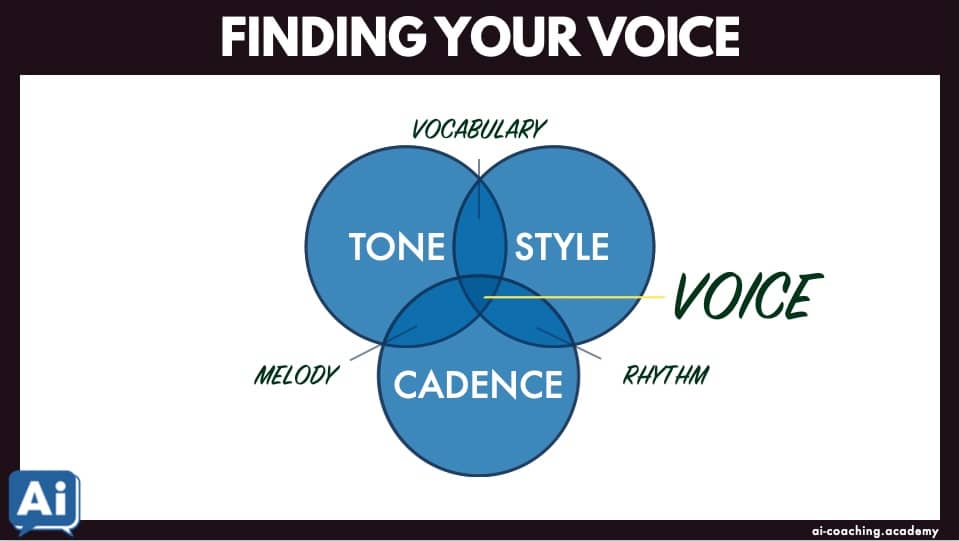
During my presentation, Create a Brand Voice Kit with AI, I demonstrated how to take a Voiceprint.
This analyses the tone, style, and cadence of your writing voice.
💡 Free Preview: AI Campus Tutorial
Every week in the AI Campus, the premium membership in the AI Coaching Academy, I publish a tutorial to help you learn a new AI skill. Here’s an example of the most recent:
🗣️ “Writing with voice is writing into which someone has breathed. It has that fluency, rhythm, and liveliness that exist naturally in the speech of most people when they are enjoying a conversation.” – Peter Elbow
⚡ Voiceprint Tutorial:
You’ll learn how to turn your writing into a Voiceprint — a reusable guide that helps ChatGPT write in your natural style by analysing your tone, structure, rhythm, and language patterns.

📝 STEP 1: Choose your writing samples
Pick at least 3 strong examples of your writing (emails, posts, articles, etc.). Use content that genuinely sounds like you — not heavily edited or AI-written.
🎙 STEP 2: Download the Voiceprint Prompt
Download this VOICEPRINT.md file.
Read the Markdown file so you learn how it works.
📋 STEP 3: Upload the prompt
Upload the Voiceprint file to a new session in your main LLM, with the prompt ‘Let’s take a Voiceprint.’
📂 STEP 4: Upload Samples
Paste or upload your writing into the LLM chat session. The more the merrier! You can upload all at once, but you will get better results by uploading one at a time.
After each submission, your LLM should reply:
CONTINUE
To finish the content collection, type:
VOICEPRINT
🔍 STEP 4: Review the output
Check if the response clearly describes how you write, not just what it feels like. Good insights are specific (e.g. how you open, structure paragraphs, or use examples). Make any edits you think would be useful.
🧪 STEP 5: Test it
Ask ChatGPT to write something using your Voiceprint.
Request 3 versions:
- Closest Match
- More Restrained
- More Amplified
Pick the one you think is most accurate, and give detailed feedback on that one.
🖌 STEP 6: Refine
Update the Voiceprint using the feedback. Don’t rebuild it from scratch — just adjust weak or inaccurate parts.
💾 STEP 7: Save it
Rename the .md file so it contains your name.
Save it in a location where you can always find it.
✒ STEP 8: Use it
Add your Voiceprint to:
- A ChatGPT Project or Claude Project (as a source file in .md)
- Or paste it into Custom Instructions / system prompt
Then reuse it in prompts like:
“Write this using my Voiceprint.”
✅ Produce Brand-Aligned Content
You now have a system that turns your writing into a reusable style guide.
The more real samples you add and refine, the more natural and consistent your AI-generated writing will sound.
🤖 Weekly Tutorials in the AI Campus
This is the type of tutorial that members of the AI Campus get every week. You can join for $19/month here:
 |
AI Campus MembershipMonthly live workshops, weekly AI tutorials, access to 100-level course recordings
NZ$19.00 NZD/month |
🛠️ [REPLAY] #CHCHAI Meetup
Marketing & Comms with AI
[1:34:11]
👓 What I’m Reading
- How to Run Hermes Agent Inside Buzz by Oliver Prompts – “Buzz is early software, and worth treating that way.”
- Artificial Intelligence used to design brand new viruses by James Gallagher – “The Stanford researchers picked the most promising 302 AI designs and synthesised them in the lab. Of these, 16 proved effective at killing E. coli bacteria.”
- My Chief of SEO, Claude Cowork Fable 5 by Sarvesh Shrivastava – “This setup is what separates a tool from a system.”







Leave A Comment